Best Baby Monitors for New Parents
Choosing the best baby monitors for new parents can feel confusing at first. Some monitors use Wi-Fi and connect to your phone. Others use a private parent unit with no app. Some track sleep, breathing motion, room temperature, movement, or crying, while others simply give you a clear video feed when your baby is resting.
For most new parents, the right baby monitor is not the one with the longest feature list. It is the one that fits your home, your comfort level, and the way you want to check on your baby during naps and overnight sleep.
This guide keeps things simple. Below, you will find our favorite baby monitors for new parents, what each one is best for, and direct Amazon links so you can check the latest price and availability before buying.
Safety note: A baby monitor is helpful, but it does not replace safe sleep practices or adult supervision. Keep monitor cords at least 3 feet away from the crib, bassinet, play yard, or any sleep space. Never place a baby monitor inside the crib or on the crib rail.
Simple Comparison Table
| Name | Best For | Features |
|---|---|---|
| Nanit Pro Smart Baby Monitor | Best Overall | Wi-Fi Smart Monitor |
| Infant Optics DXR-8 PRO | Best Non-Wi-Fi Monitor | Dedicated Parent Unit |
| Owlet Dream Duo | Best Health Tracking | Smart Monitor + Wearable Sock |
| Babysense HD Split-Screen Monitor | Best for Twins or Two Rooms | Non-Wi-Fi Split Screen |
| CuboAi Smart Baby Monitor 3 | Best Smart Alerts | Wi-Fi Smart Monitor |
| Miku Pro Smart Baby Monitor | Best Contact-Free Breathing Tracking | Wi-Fi Smart Monitor |
| VTech Smart WiFi Baby Monitor | Best Parent Unit + App Option | Hybrid Wi-Fi Monitor |
Best Baby Monitors for New Parents
Nanit Pro Smart Baby Monitor
Best for: Parents who want the best overall smart baby monitor.
The Nanit Pro Smart Baby Monitor is one of the strongest choices for new parents who want a premium Wi-Fi monitor with a polished app experience. It is designed for parents who want more than a basic video feed. With app-based viewing, night vision, two-way audio, sound and motion notifications, and sleep-focused features, it gives parents a clear view of the nursery from a phone or compatible smart display.
What makes Nanit especially appealing is its overhead crib view. This gives parents a clean look at the sleep space, which can be helpful during naps and overnight checks. It is also a good fit for parents who want sleep insights and optional breathing motion features with Nanit accessories.
This is not the simplest monitor in the group. It relies on Wi-Fi, and some families may prefer a dedicated parent screen instead of using a phone. But for new parents who want a modern smart monitor with strong nursery features, Nanit is an excellent place to start.
Why It Stands Out
- Premium smart baby monitor experience
- Clear app-based video monitoring
- Useful for sleep tracking and nursery insights
- Good choice for parents who want remote viewing
- Modern design that fits well in a nursery
Pros
- Smart app access
- Clear nursery view
- Sleep-focused features
- Two-way audio
- Works well for tech-comfortable parents
Cons
- Requires Wi-Fi
- Some advanced features may depend on accessories or app plans
- Not ideal if you want a simple non-Wi-Fi parent unit
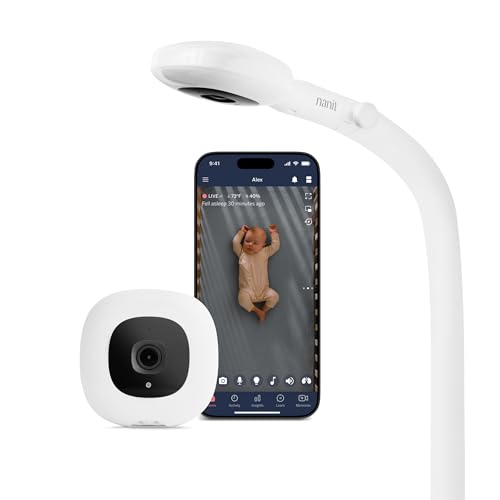
- ADVANCED SLEEP INSIGHTS & AUTOMATIC TRACKING: Unlike basic audio monitors or standard WiFi cameras, this smart baby moni…
- STAY CONNECTED FROM ANYWHERE: Delivering peace of mind for parents, the Nanit baby monitor with an app keeps your family…
- CUSTOMIZABLE SMART ALERTS: Get instant, customizable notifications for motion and sound detection, plus room temperature…
Infant Optics DXR-8 PRO
Best for: Parents who want a reliable non-Wi-Fi baby monitor.
The Infant Optics DXR-8 PRO is a favorite for parents who want a dedicated video monitor without relying on Wi-Fi or a smartphone app. It comes with a parent unit, which means you can check the screen quickly without opening your phone in the middle of the night.
This monitor is a strong choice for parents who value privacy, simplicity, and a more traditional baby monitor setup. It is especially helpful in homes where Wi-Fi can be spotty, or for families who do not want another app connected to the nursery.
The Infant Optics DXR-8 PRO also includes features that parents use daily, including pan, tilt, zoom, night vision, two-way talk, and active noise reduction. For many new parents, that is enough. You get a clear way to see and hear your baby without extra data, subscriptions, or smart alerts.
Why It Stands Out
- No Wi-Fi required
- Dedicated parent screen
- Simple overnight use
- Good privacy-focused option
- Strong pick for grandparents and caregivers
Pros
- Easy to use
- No phone app needed
- Active noise reduction
- Pan, tilt, and zoom
- Good for travel to family homes
Cons
- No remote viewing from outside the home
- No sleep tracking
- No smart health alerts

- ACTIVE NOISE REDUCTION (ANR): Active Noise Reduction (ANR) – Patent No. [11,875,769 B2] technology which filters out fan…
- EASY BATTERY REPLACEMENT: Designed with real-life parenting in mind, the user-replaceable battery restores full portabil…
- CRYSTAL CLEAR DAY/NIGHT VISION: See your baby in perfect detail. From your bed, simply press a button to pan, tilt, or z…
Owlet Dream Duo
Best for: Parents who want video monitoring plus health tracking.
The Owlet Dream Duo is designed for parents who want more than a camera. It combines a video baby monitor with Owlet’s Dream Sock, which tracks health and sleep-related information through a wearable sock.
This type of monitor is best for parents who feel reassured by extra data. Instead of only seeing your baby on video, you can also view information such as sleep trends and health readings through the Owlet app, depending on the exact model and current app features.
Owlet is a more involved system than a simple camera monitor. You need to use the sock correctly, keep it charged, and make sure it fits your baby properly. It is also usually a higher investment than a standard video monitor. For parents who want health-focused monitoring, though, it is one of the most recognizable names in the category.
Why It Stands Out
- Combines video monitoring with wearable tracking
- Good for parents who want more health-related insight
- Helpful app experience
- Designed for sleep and wellness monitoring
- Strong option for data-focused families
Pros
- Video plus wearable sock
- Health and sleep insights
- Useful alerts through the app
- Good for parents who want extra reassurance
Cons
- Higher price point
- Requires proper sock use
- More setup than a basic monitor
- Not a replacement for medical advice or safe sleep practices
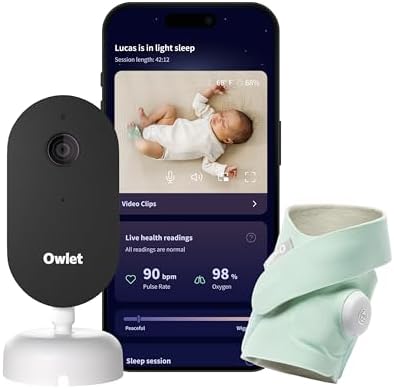
- What is the Owlet Dream Duo? Dream Duo is Owlet’s most advanced monitoring system, combining the FDA-cleared Dream Sock …
- How does the system track my baby’s well-being? Dream Sock uses medical-grade pulse oximetry to track your baby’s pulse …
- What is the video quality of the included camera? See your baby clearly day or night with crystal-clear 2K HD video, off…
4. Babysense HD Split-Screen Baby Monitor
Best for: Twins, siblings, or monitoring two rooms.
The Babysense HD Split-Screen Baby Monitor is a practical choice for families who want to see two spaces at once. It is especially helpful for twins, siblings, or parents who want one camera in the nursery and one in another room.
This is a non-Wi-Fi monitor, so it is designed around a dedicated parent unit instead of a phone app. That makes it easy to keep nearby during naps, overnight sleep, or while moving around the house.
The split-screen view is the main reason to choose this monitor. Instead of switching back and forth between two cameras, parents can keep an eye on both views from one screen. For growing families, that simplicity can be very useful.
Why It Stands Out
- Split-screen viewing
- Useful for two children or two rooms
- No Wi-Fi required
- Dedicated parent unit
- Simple setup for everyday use
Pros
- Great for twins
- Good for siblings
- No app needed
- Parent screen included
- Practical for nursery plus playroom setups
Cons
- No remote app viewing
- Not as smart as Wi-Fi monitors
- Exact bundle details may vary, so check the Amazon listing before buying

- Split-Screen HD Display with 2 Night Light Cameras: Keep an eye on both babies at once on a single screen, while the aud…
- Hack-Proof, No WiFi & High Definition View: The 720 HD image on the large 5″ display provides crystal clear secure viewi…
- Soothe & Comfort Your Baby: Use the white noise sound, two-way audio, or the programmed lullaby sounds to calm your baby…
5. CuboAi Smart Baby Monitor 3
Best for: Parents who want smart alerts and app-based monitoring.
The CuboAi Smart Baby Monitor 3 is built for parents who want a smart monitor with proactive alerts. Depending on the model and setup, CuboAi focuses on features such as covered face alerts, rollover alerts, cry detection, night vision, two-way audio, and room condition monitoring.
This is a good option for parents who want a modern app-based monitor that does more than show a live video feed. It can be especially appealing for parents who like smart notifications and want extra information during naps and overnight sleep.
CuboAi is best for families who are comfortable using an app as their main monitor screen. If you prefer a dedicated handheld parent unit, a non-Wi-Fi monitor like Infant Optics or Babysense may feel easier.
Why It Stands Out
- Smart safety-style alerts
- Modern app experience
- Strong choice for tech-friendly parents
- Useful nursery monitoring features
- Good design for modern nursery spaces
Pros
- Smart alerts
- App-based video
- Two-way audio
- Night vision
- Helpful for parents who want proactive notifications
Cons
- Requires Wi-Fi
- May feel too app-heavy for some families
- Feature availability may vary by model and plan

- SAFER SLEEP WITH SMARTER TECH: Advanced AI detects covered faces and rollovers, alerting parents instantly. Plus, track …
- MONITOR BABY DAY & NIGHT: Enjoy ultra-sharp 2.5K QHD video and crystal-clear night vision to see your baby in all condit…
- IMPROVE BABY’S SLEEP QUALITY: Get detailed sleep reports on duration, wake times, and caregiver interactions. Automatica…
6. Miku Pro Smart Baby Monitor
Best for: Parents who want contact-free breathing tracking.
The Miku Pro Smart Baby Monitor is designed for parents who want breathing and sleep tracking without placing a wearable on the baby. Instead of using a sock, band, or clip, Miku uses contact-free monitoring technology through the camera system.
This can be appealing for families who like the idea of breathing insights but do not want to manage a wearable during bedtime. It also keeps the setup clean, with the monitor doing the tracking from outside the crib.
As with other smart monitors, Miku depends on Wi-Fi and app access. Before buying, check the current Amazon listing carefully for availability, included accessories, support details, and any membership terms.
Why It Stands Out
- Contact-free breathing tracking
- No wearable required
- Smart app experience
- Good for parents who want sleep insights
- Clean nursery setup
Pros
- No sock or wearable
- Tracks breathing and sleep
- Night vision
- Two-way audio
- Good fit for data-focused parents
Cons
- Requires Wi-Fi
- Availability may change
- Current membership or app terms should be checked before buying
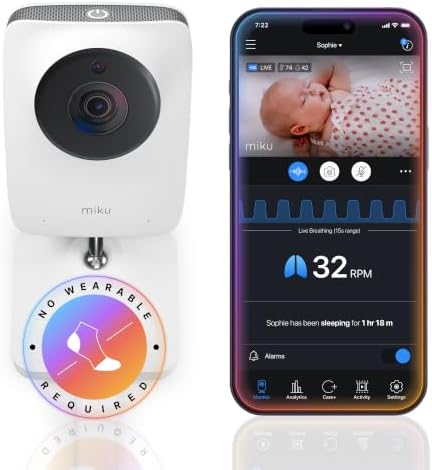
- BENEFITS OF CONTACT-FREE MONITORING: Truly smart contact-free breathing and sleep tracking – powered by SensorFusion tec…
- GAIN INSIGHT INTO YOUR BABY’S BREATHING, WELLNESS AND SLEEP PATTERNS: Track your baby’s unique rhythms with precision us…
- SAFE AND SECURE MONITORING FROM ANYWHERE: Miku Pro keeps your connection private and your baby protected with a tamper-r…
7. VTech Smart WiFi Baby Monitor
Best for: Parents who want both a parent unit and app access.
The VTech Smart WiFi Baby Monitor is a practical middle-ground option for parents who want the comfort of a dedicated parent screen plus the flexibility of remote app viewing. This style is helpful if you want to check the monitor from the parent unit at home but still like the option to use a phone when needed.
VTech baby monitors often include parent-friendly features such as pan and tilt, zoom, night vision, two-way talk, temperature monitoring, and app access. Exact features can vary by model, so check the Amazon listing carefully before ordering.
This is a strong choice for parents who do not want to choose between a traditional monitor and a smart Wi-Fi monitor. It gives you a little of both.
Why It Stands Out
- Parent unit plus app access
- Good everyday value
- Helpful nursery features
- Flexible for at-home and remote viewing
- Good option for parents who want a hybrid monitor
Pros
- Dedicated screen
- Remote app viewing
- Night vision
- Two-way talk
- Pan and tilt controls on many models
Cons
- Model names can be confusing
- Exact features may vary
- Wi-Fi features depend on your home connection
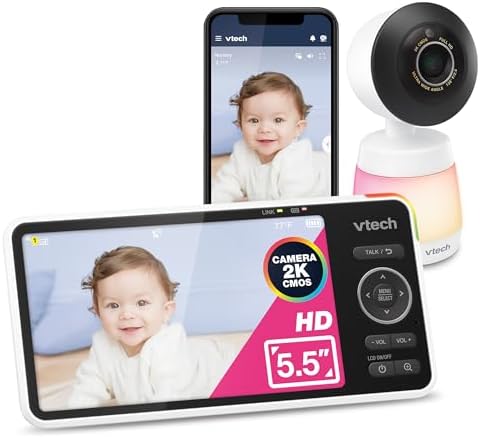
- Check on your baby from anywhere — free app on your phone — Open the free MyVTech Baby Plus app and see your baby live f…
- The sharpest picture in the room — 2K video clear enough to see your baby breathe — The 2K camera delivers more than twi…
- See the whole room in one shot — wide angle means nothing is out of frame — The wide-angle lens captures the entire nurs…
How to Choose the Best Baby Monitor for New Parents
Choose Wi-Fi if you want app access
A Wi-Fi baby monitor is best if you want to view the camera from your phone, receive smart alerts, or check in when you are away from home. Smart monitors are also better if you want sleep insights, movement alerts, or app-based sharing with another caregiver.
Choose non-Wi-Fi if you want simplicity
A non-Wi-Fi baby monitor is best if you want a dedicated parent unit and fewer app settings. These monitors are popular with parents who want a private, simple connection inside the home.
Choose split-screen if you have twins or siblings
If you are monitoring two cribs or two rooms, a split-screen monitor can save time. It lets you see both camera views from one screen instead of switching back and forth.
Choose health tracking only if you want extra data
Wearable and breathing-tracking monitors can give parents extra reassurance, but they are not necessary for every family. They also do not replace safe sleep habits, medical guidance, or caregiver judgment.
Baby Monitor Safety Tips
- Keep cords at least 3 feet away from the crib, bassinet, play yard, or any sleep space.
- Never place the monitor inside the crib.
- Do not attach the monitor to the crib rail.
- Use wall mounts or floor stands according to the manufacturer’s instructions.
- Check the setup again as your baby grows and starts reaching, pulling, crawling, or standing.
- Use strong passwords for Wi-Fi monitors and keep app software updated.
- Follow safe sleep guidance: place baby on their back, on a firm, flat sleep surface, with no loose blankets, pillows, or soft items in the crib.
Final Verdict
For most new parents, the Nanit Pro Smart Baby Monitor is the best overall choice because it combines smart video monitoring, sleep-focused features, and a modern app experience.
If you want a simple non-Wi-Fi monitor, the Infant Optics DXR-8 PRO is the better fit. If you have twins or need two camera views, the Babysense HD Split-Screen Baby Monitor is the most practical pick.
For parents who want more health-related insight, the Owlet Dream Duo and Miku Pro are worth considering. For a flexible parent unit plus app setup, the VTech Smart WiFi Baby Monitor is a smart middle-ground option.
The best baby monitor is the one that helps you check on your baby calmly, safely, and easily.
FAQs
Do new parents really need a baby monitor?
Most new parents find a baby monitor helpful, especially once the baby naps or sleeps in a separate room. It is not required, but it can make daily checks easier and give parents more confidence during rest times.
Is a Wi-Fi or non-Wi-Fi baby monitor better?
A Wi-Fi baby monitor is better if you want app access, smart alerts, and remote viewing. A non-Wi-Fi baby monitor is better if you want a dedicated screen, simple setup, and no internet connection.
What is the best baby monitor for first-time parents?
The Nanit Pro is a strong overall pick for first-time parents who want smart features. The Infant Optics DXR-8 PRO is a strong pick for first-time parents who want a simple non-Wi-Fi monitor.
What is the safest place to put a baby monitor?
Place the baby monitor where it gives a clear view of the crib while keeping all cords and monitor parts out of reach. Cords should stay at least 3 feet away from the crib, bassinet, play yard, or sleep space.
Are breathing baby monitors worth it?
Breathing baby monitors may be worth it for parents who want extra data and alerts. They are not required for every family and should not replace safe sleep practices, caregiver supervision, or advice from your pediatrician.
What is the best baby monitor for twins?
The Babysense HD Split-Screen Baby Monitor is a good choice for twins because it lets parents view two cameras on one screen.
Can grandparents use these baby monitors?
Yes. For grandparents, a non-Wi-Fi monitor with a parent unit is often easier than an app-based smart monitor. The Infant Optics DXR-8 PRO and Babysense HD Split-Screen Monitor are both practical options.
Sources and Safety References